Capstone 48 — AI Agents & Orchestration
← Full AI Course · Next: Graphs, Ontologies & GraphRAG →
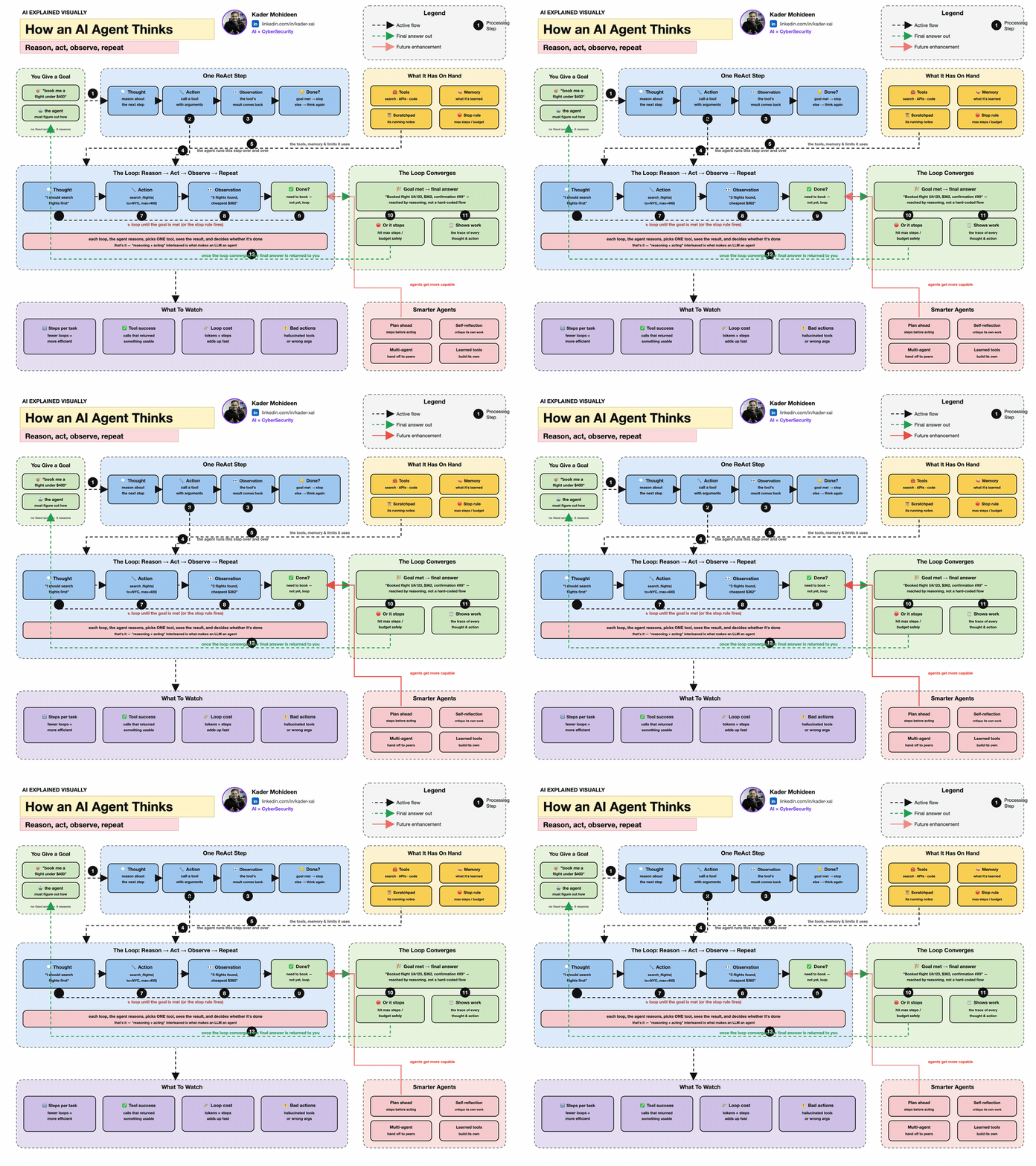
An AI agent is not simply a chatbot with a more exciting name. A language model produces text. An agent uses a model inside a controlled loop so it can observe a situation, choose an action, use a tool, inspect the result, and decide what to do next.
The shortest useful definition: an agent is a model plus instructions, tools, state, a loop, and rules about when to stop.
1. The agent loop in simple English
Imagine asking an assistant to find a suitable hotel for a business trip:
- Goal — “Find a Riyadh hotel near the meeting, under the budget.”
- Observe — read the dates, address, budget, and preferences.
- Decide — choose which information is missing and which tool can get it.
- Act — call maps, availability, or pricing tools.
- Inspect — check whether the result is useful, current, and internally consistent.
- Repeat or stop — gather more evidence, ask the user, or present the answer.
The loop is powerful because a model no longer has to contain every answer in its weights. It can obtain current evidence from outside systems. The loop is also risky because a wrong sentence can now become a wrong action. That is why approvals, permissions, limits, and logs are part of the design—not optional polish.
2. The mathematics of choosing an action
Suppose an agent can choose among four actions:
\[A = \{\text{search},\ \text{calculate},\ \text{ask-user},\ \text{finish}\}\]
The model produces one raw score, or logit, for every action. Softmax turns the logits into probabilities:
\[\pi(a\mid s)=\frac{e^{z_a}}{\sum_j e^{z_j}}\]
In words: given the current state \(s\), exponentiate every action score \(z\), then divide each by the total. The result is a probability distribution whose values add to 1.
The exact same idea in PyTorch:
import torch

actions = ["search", "calculate", "ask_user", "finish"]
logits = torch.tensor([2.1, 0.4, 1.2, -0.2])
probabilities = torch.softmax(logits, dim=0)

for action, probability in zip(actions, probabilities):
    print(f"{action:10s} {probability.item():.3f}")

chosen = actions[probabilities.argmax().item()]
print("chosen action:", chosen)  # search
Real agents do not normally expose this exact four-action tensor to you—the model selects from tool schemas by generating structured output. But the mental model is correct: context creates scores; scores create a distribution; decoding selects an action.
High probability is not proof. A model can be confidently wrong. Validate tool arguments, constrain permissions, check outputs, and require human approval for consequential actions.
3. A tiny agent loop in code
This example is deliberately vendor-neutral. model_decide stands in for any model that returns structured data.
TOOLS = {
    "calculator": lambda expression: eval(expression, {"__builtins__": {}}, {}),
    "lookup_policy": lambda topic: {"travel_limit": "SAR 900/night"}.get(topic)
}

def run_agent(goal, model_decide, max_steps=6):
    history = [{"role": "user", "content": goal}]

    for step in range(max_steps):
        decision = model_decide(history)  # validated structured output

        if decision["type"] == "finish":
            return decision["answer"]

        tool_name = decision["tool"]
        if tool_name not in TOOLS:
            raise ValueError("Tool is not permitted")

        result = TOOLS[tool_name](**decision["arguments"])
        history.append({"role": "tool", "name": tool_name, "content": str(result)})

    raise RuntimeError("Agent stopped: maximum step limit reached")
Three small controls matter more than they look:
TOOLSis an allowlist. The agent cannot invent arbitrary capabilities.- tool arguments should be validated against a schema before execution.
max_stepsprevents an accidental or malicious infinite loop.
For production code, do not use eval; the tiny calculator keeps the example readable, but a real calculator tool must parse an allowed expression safely.
4. Tools, resources, memory, and state
These words are often mixed together. Keep them separate:
| Piece | Question it answers | Example |
|---|---|---|
| Instructions | How should I behave? | “Show sources and never purchase without approval.” |
| Tool | What action can I take? | Search, run SQL, create a ticket |
| Resource | What context can I read? | A policy document, file, record, or Git history |
| Working state | What is happening in this run? | Current plan, tool results, remaining steps |
| Long-term memory | What should persist across runs? | A confirmed preference or prior decision |
Memory should be selective. Saving every sentence creates noise, privacy problems, and stale beliefs. Good memory systems save a compact, attributable fact and keep the original source available for verification.
5. One agent or many?
Use the smallest architecture that can do the job.
One agent with tools
Best when one set of instructions can make all decisions. It is easier to test, cheaper to run, and simpler to debug.
Manager with specialists
A manager owns the user conversation and calls specialist agents as tools. Use this when one component should combine outputs and enforce a consistent final standard.
Handoffs
A triage agent transfers control to a specialist. Use this when the specialist should take over the conversation with a focused prompt and toolset.
Deterministic workflow around agents
Code decides the order; models handle only the uncertain steps. This is often the strongest production pattern because business rules stay explicit.
Current agent frameworks commonly expose tools, guardrails, handoffs, sessions, and tracing. The OpenAI Agents SDK documentation describes both manager-style orchestration and handoffs, while its tracing guide shows why model turns, tool calls, guardrails, and handoffs need an inspectable record.
6. MCP and A2A: two different connection problems
Model Context Protocol (MCP) connects an AI application to capabilities and context. Its server primitives are prompts, resources, and tools. In simple terms: MCP gives an agent a standardized socket for the things it can read or do. The current protocol uses a host–client–server architecture with explicit capability negotiation and security boundaries. See the official MCP architecture.
Agent2Agent (A2A) connects independent agent systems to one another. In simple terms: one agent can discover what another agent can do, exchange messages or files, and manage a shared task without seeing the other agent’s private internals. See the official A2A specification.
| Protocol | Connects | Think of it as |
|---|---|---|
| MCP | Agent application ↔︎ tools and context | A standard capability port |
| A2A | Agent system ↔︎ another agent system | A standard collaboration language |
Neither protocol makes an agent intelligent or safe by itself. They standardize communication; your system still owns identity, permission, validation, consent, and audit.
7. Guardrails and approvals
Separate four layers of protection:
- Input checks — is the request allowed and sufficiently clear?
- Tool checks — is this tool permitted, and are its arguments valid?
- Execution controls — sandboxing, least privilege, rate limits, budgets, and timeouts.
- Output checks — is the final answer grounded, safe, and honest about uncertainty?
A useful approval rule is based on reversibility:
| Action | Default handling |
|---|---|
| Read a public page | Allow and log |
| Draft an email | Allow draft; do not send |
| Change a ticket field | Preview and confirm |
| Purchase, delete, publish, or message a person | Require explicit approval |
8. Evaluate the whole trajectory
Checking only the final sentence hides agent failures. Evaluate the trajectory:
- Did it choose the right tool?
- Were the arguments correct and minimal?
- Did it notice tool errors?
- Did it use the returned evidence faithfully?
- Did it stop at the right time?
- Did it request approval before a consequential action?
- How much time, money, and context did the run consume?
One simple combined score is:
\[S = w_tT + w_gG + w_sS_f - w_cC - w_lL\]
In words: reward task success (\(T\)), grounding (\(G\)), and safety (\(S_f\)); subtract normalized cost (\(C\)) and latency (\(L\)). The weights express what the application values.
import torch

metrics = torch.tensor([0.95, 0.90, 1.00, 0.35, 0.40])
weights = torch.tensor([0.35, 0.25, 0.25, -0.08, -0.07])
score = torch.dot(metrics, weights)
print(round(score.item(), 3))
9. The design checklist
- Begin with one agent and the smallest useful toolset.
- Keep permissions narrower than the model’s instructions.
- Use structured tool schemas and validate every argument.
- Put irreversible actions behind explicit human approval.
- Set step, time, token, and cost limits.
- Record traces without leaking secrets or unnecessary personal data.
- Test bad tools, empty results, prompt injection, and partial failure.
- Evaluate trajectories, not only final answers.
- Prefer deterministic code for rules that must always hold.
Continue the course: connect this capstone to Knowledge Representation & Ontologies, Planning, LLMs, Retrieval, and Production Serving.
← Course map · Next capstone: Graphs, Ontologies & GraphRAG →